VFP Developer Getting Started
|
VFP Developer Getting Started |

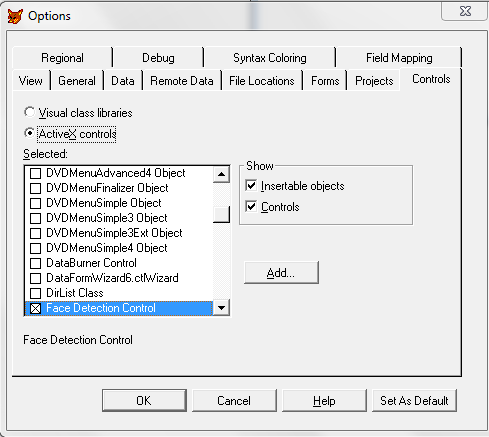
Assuming that you have already run the Face Detection SDK ActiveX Control installation program and started Visual Foxpro, the next step is to create a project. To do this begin by selecting the "New Project" command from the file menu. Then choose Tools->Options->Controls->ActiveX controls, checked "Face Detection Control" and press "Set as default" to include the file "Face Detection Control" into the new project.
|
|
Select Control
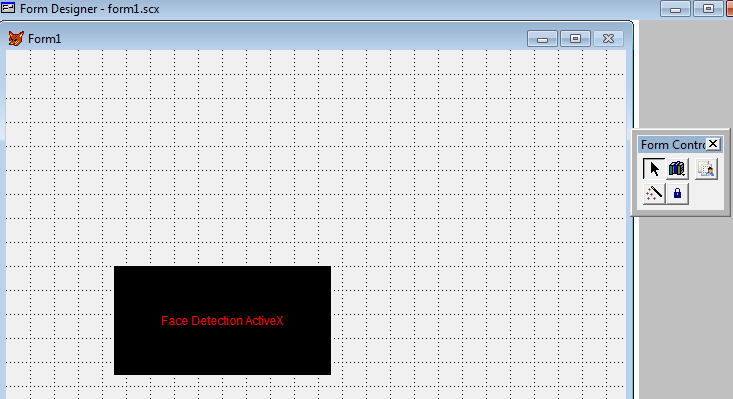
Click on the Face Detection ActiveX Control icon and draw it on the form. A rectangle should appear on the form, and the Visual Foxpro Project window form on the right should display Face Detection ActiveX Control's properties.
Add Command Button in Form, add the following line of code, which will count the total face of our demo1.png file.
thisform.Olecontrol1.SetMinNeighbors(4)
thisform.Olecontrol1.SetScaleFactor(1.06)
iTotalFace = thisform.Olecontrol1.CountFaces("C:\Program Files (x86)\Face Detection ActiveX Control\FacePhoto\demo1.png")
=MessageBox( str(iTotalFace))